- Thread starter
- #81
Just a note that Trading is blocked until the Auction rounds have finished. Once all 8 rounds are completed, you are able to trade. What this means is that if you are hoarding assets for future trade bait in other positions, it will impact your ability to bid on players for later rounds as you are unable to trade those assets until the completion of the auction and they will count in your cap which impacts your ability to bid.
It is also worth explaining the 3 buttons at the end of the player screen view on your franchise view i.e. https://nzwarriors.com/ultimate-team-franchises/1/ (you will only see those buttons on your own franchise - would be rather weird if you could release a player from a franchise you didnt own lol)

Release Player
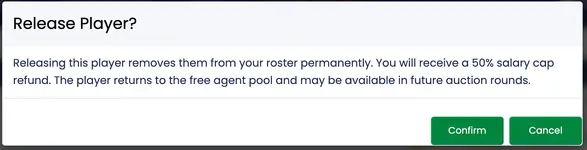
First button allows you to release a player, but you will have to absorb 50% of their cap. When you click on the button you will get this popup so you understand what you are doing:
Stand Down Player
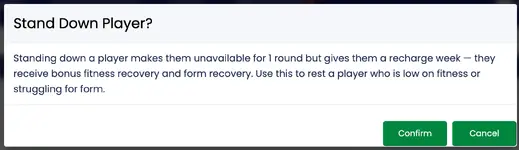
Second button allows you to stand down a player/rest a player for a week. Essentially it means you are giving them a week to freshen up.
Add Player to Trading Block
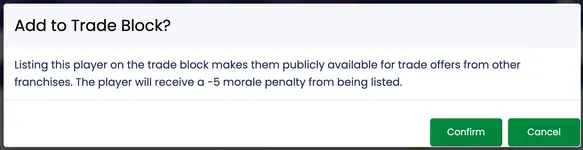
Third button allows you to put a player on the trading block. Teams will become aware that you are interested in trading for that player and may encourage putting trade offers for him.
Also keep in mind that even though the squad size is 30, i dont envisage anyone picking 30 players. Ideally you should keep a few spots free. You may choose to keep salary cap available for use in trades/guest players who become available for stints of 2/4/6 weeks who will become available via an auction through the season etc.
Note there are still lots of players to come. All auction rounds were equally divided randomly.
Do not despair if you are missing out on targets, seen some very close losses (also note that if two people bid the same amount, player goes to the first bidder - not sure if we have seen that yet).
Does that make sense? Hit me up if there are any questions or need clarifications.
It is also worth explaining the 3 buttons at the end of the player screen view on your franchise view i.e. https://nzwarriors.com/ultimate-team-franchises/1/ (you will only see those buttons on your own franchise - would be rather weird if you could release a player from a franchise you didnt own lol)
Release Player
First button allows you to release a player, but you will have to absorb 50% of their cap. When you click on the button you will get this popup so you understand what you are doing:
Stand Down Player
Second button allows you to stand down a player/rest a player for a week. Essentially it means you are giving them a week to freshen up.
Add Player to Trading Block
Third button allows you to put a player on the trading block. Teams will become aware that you are interested in trading for that player and may encourage putting trade offers for him.
Also keep in mind that even though the squad size is 30, i dont envisage anyone picking 30 players. Ideally you should keep a few spots free. You may choose to keep salary cap available for use in trades/guest players who become available for stints of 2/4/6 weeks who will become available via an auction through the season etc.
Note there are still lots of players to come. All auction rounds were equally divided randomly.
Do not despair if you are missing out on targets, seen some very close losses (also note that if two people bid the same amount, player goes to the first bidder - not sure if we have seen that yet).
Does that make sense? Hit me up if there are any questions or need clarifications.